
GST Login on the official GST portal enables taxpayers to file returns, apply for refunds, and respond to notices directly online. It also allows users to cancel their GST registration at any time. By using valid login credentials, businesses can access various compliance services and communicate with GST authorities without visiting CBIC offices in person. This eliminates the need for physical submission of GST returns. In this article, we will explore the GST login portal in detail, the services available before and after logging in, how to obtain GST login credentials, and the step-by-step process to successfully access the GST portal.
GST Login for Registered Users
New taxpayers can log in to the GST portal using their GSTIN (Goods and Services Tax Identification Number) and the password created during the GST registration process.
- Visit the official GST portal at https://www.gst.gov.in
- Click on the ‘Login’ button available at the top-right corner of the homepage.
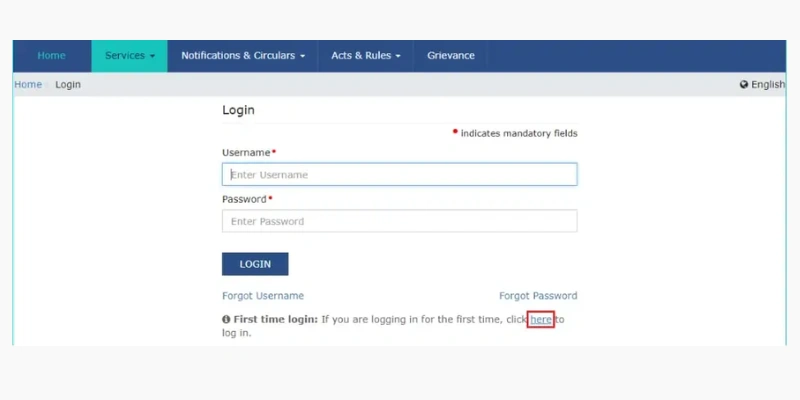
- After clicking, the GST login page will open on your screen.
| At the bottom of the page, you will find the first-time login option, which states: “First time login: If you are logging in for the first time, click here to login.” |
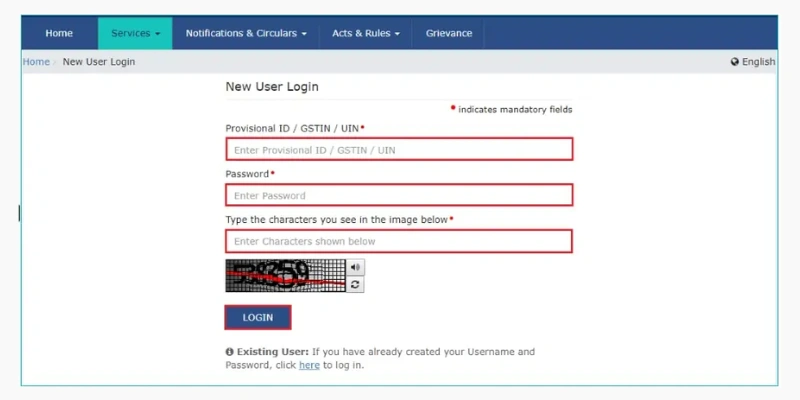
- The New User Login page will now appear. Enter your Provisional ID, GSTIN, or UIN along with the password sent to your registered email during the registration process. Then, fill in the captcha code and click on the Login button.
- After entering the new credentials, the next page will open. Here, you must create a new username and password for future GST portal logins. Once done, click on “Submit.
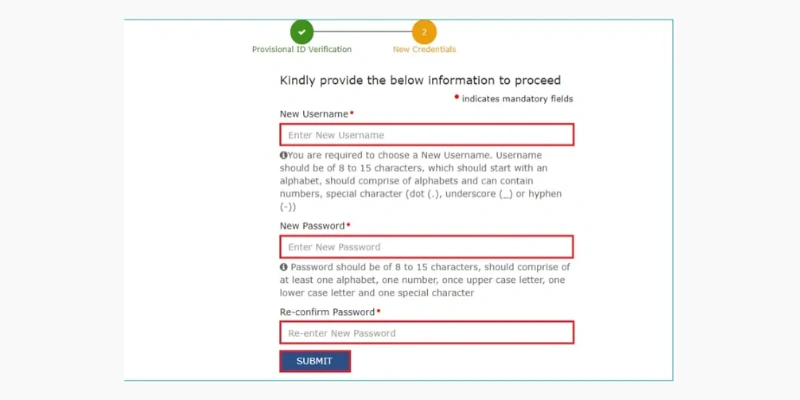
- Once your new username and password are successfully created, a confirmation message will appear on the screen. You can now access the GST portal using your newly set login credentials.
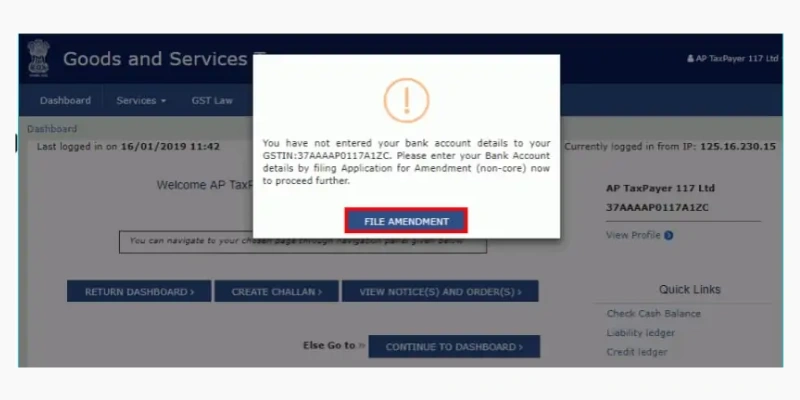
- When you log in for the first time, a pop-up message will appear prompting you to file a non-core amendment application. Click on the ‘FILE AMENDMENT’ option. This step allows you to add your bank account details, which are essential for completing transactions during GST return filing.
- Next, an editable version of the application form will appear on your screen.
You can update your bank account information by selecting the ‘Add New’ option available under the ‘Bank Accounts’ section.
GST Login for Existing Users
Existing users can follow the steps below to log in to the GST Login portal.
- The image below shows the layout of the homepage before logging in. Click on the ‘Login’ option located at the top-right corner of the screen.
- The login page will appear next. Enter your username and password to access your account.
- You will then be taken to the dashboard, as shown in the image below. From this dashboard, you can quickly access your profile, check orders and notices, and generate a payment challan with just a few clicks.
Services Offered: GST Login Portal
After logging in to the GST Portal, you can access a wide range of services by clicking on the ‘Services’ tab.
Registration: This section allows you to amend core registration details, opt for the composition scheme, and perform other registration-related tasks. The image below illustrates the services available under the “Registration” tab on the GST dashboard.
Ledgers: In this section, you can access the electronic cash ledger, credit ledger, and other ledger-related facilities. The image below shows the options available under the ‘Ledgers’ tab on the GST dashboard.
Returns: This section allows you to access the return dashboard, monitor the status of your returns, and perform related tasks. The image below displays the services available under the ‘Returns’ tab on the GST dashboard.
Payments: In this section, you can generate payment challans, view saved challans, and perform other payment-related activities. The image below illustrates the services available under the ‘Payments’ tab on the GST dashboard.
User Services: This section provides a wide range of services, including the ability to view notices and orders. The image below shows the various services available under the ‘User Services’ tab on the GST dashboard.
Refunds: In the ‘Refunds’ section, you can submit refund applications, track their status, and manage related tasks. The image below displays the services available under the Refunds tab on the GST dashboard.
| Note: The other tabs- GST Law, Search Taxpayer, Help, and e-Way Bill System- provide the same services after logging in as they do before login. |
FAQ
What is GST Login?
GST Login is the process of accessing the GST portal using your GSTIN (or UIN) and password to file returns, claim refunds, and manage compliance-related activities online.
How can I log in to the GST portal for the first time?
First-time users need to use their Provisional ID/GSTIN and the password received during registration. After logging in, they must create a new username and password for future access.
What services can I access after GST Login?
After logging in, users can file returns, track refunds, respond to notices, update bank account details, view ledgers, generate payment challans, and manage other GST compliance tasks.
What should I do if I forget my GST Login password?
If you forget your password, click the ‘Forgot Password’ link on the login page. Follow the instructions to reset your password using your GSTIN, email, or mobile number.